Features
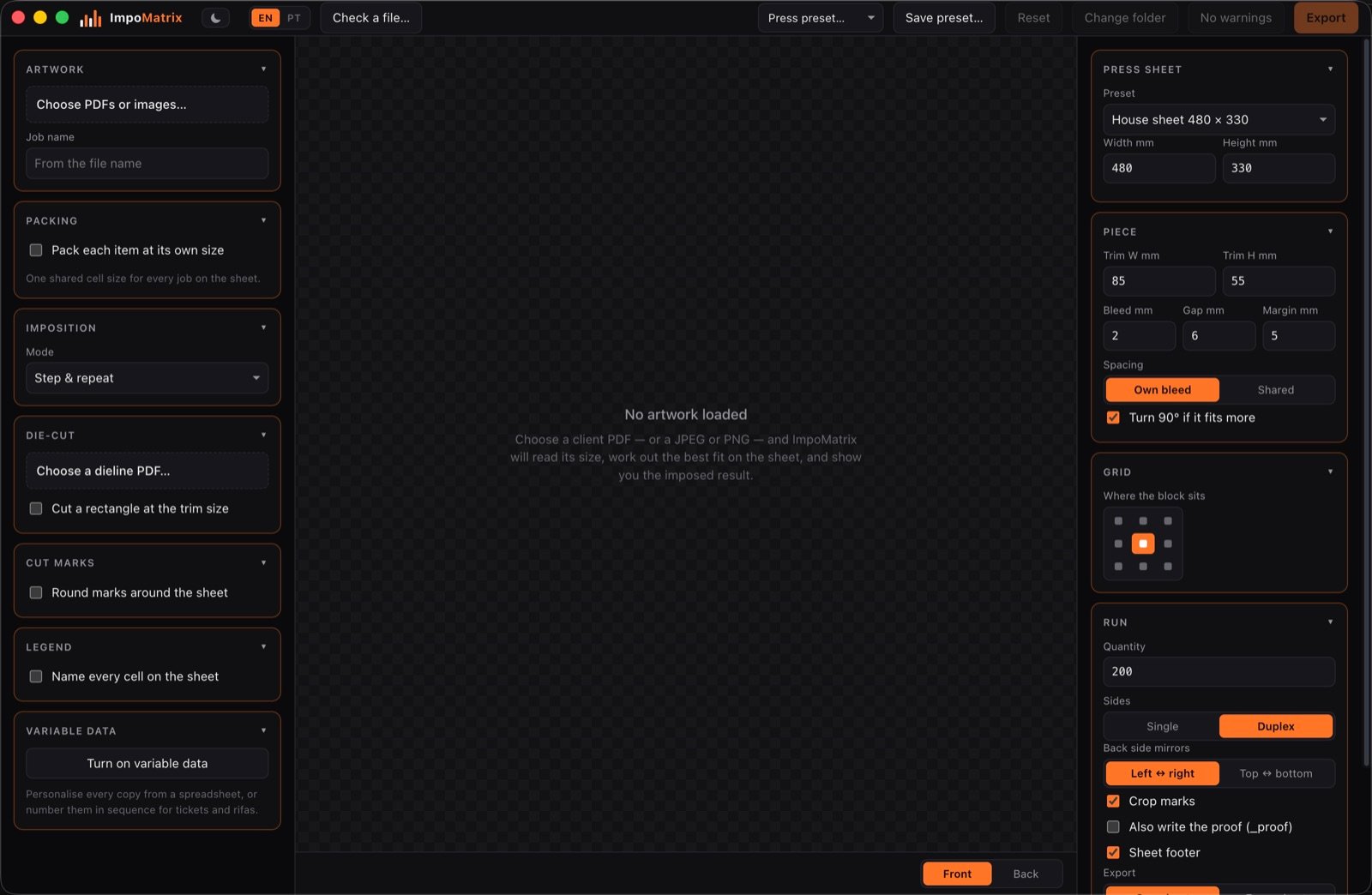
The job sits in the left column, the press in the right one, and the sheet in the middle. Everything below lives in one of those sections.
The sheet and the piece
The press sheet is set in millimetres and saved into a preset — no format is imposed by the program. For the piece, ImpoMatrix reads the trim and the bleed out of the PDF itself and lets you correct them by hand.
- Gap and margin. The distance between cuts, and the clearance left all the way round.
- Own or shared bleed. Two pieces side by side can share one bleed, and the sheet holds more.
- Turn 90° if more fit. The program tries the piece on its side and keeps whichever yields.
- Columns and rows by hand. When the finishing decides, pin the grid. A request larger than fits is clamped to what does, and the job reports the difference rather than refusing.
- Where the block sits. Nine positions — centred, or pushed to any edge or corner for gripper or cutting reasons.
A static job writes one sheet, and the proof says how many times to run it — every sheet is identical, and writing a thousand identical pages only fattens the file. With variable data it writes them all, because no two are the same.
Imposition modes
Step and repeat
The same piece repeated across the sheet, as many times as fit. The everyday case: cards, flyers, labels.
Gang on one sheet
Several same-size jobs sharing the sheet. Cells go to each job in proportion to what it ordered, and each one sits in a contiguous block so the cut plan stays simple.
Booklets
Saddle-stitched or cut and stacked. Pages come out in the order the fold and the trim require.
Ganging does not always save paper, and the program tells you. Pieces of the same size carry the same area whether they share a sheet or not — the saving comes only from orders too small to fill a sheet alone. Six orders of 10 on a 25-up sheet take 6 sheets apart and 3 ganged; four orders of 100 take 16 apart and 17 ganged. The summary reports both numbers.
Die-cutting
Load the dieline PDF and it becomes part of the job: it comes out as a separate _dieline file for the cutting table, in register with what is printed.
With nesting on, the sheet stops being a grid. Each piece is placed by its cut outline rather than by the box around it, which changes everything on a pointed shape: the same star gives 77 pieces nested against 54 on a grid. The gap now measures the distance between cuts, and it has to be larger than the bleed — or a piece prints over its neighbour.
A nested sheet does not go to the guillotine. It is for a die, a laser or a cutting table. The warning appears every time nesting is on, and it cannot be switched off.
Duplex
The back is not the front with the positions moved. A mirror reverses the sense of a rotation, so a piece turned 90° on the front has to be turned −90° on the back for the client’s artwork to read the right way up. ImpoMatrix works that out piece by piece, and knows the difference between flipping the sheet on the long edge and on the short one.
A block pushed to the left mirrors to the right on its own, which is what turning the sheet over actually does.
Variable data
Every copy can carry its own name, number or code. The data comes from a spreadsheet (CSV), or from a sequence numbering for tickets and raffles.
- Cut and stack is the default order: once the stack is guillotined, each pile is already in sequence. Sequential order fills each sheet in reading order, which suits personalised cards and not numbered tickets.
- Vector codes — QR, Code 128 and EAN-13 — drawn as geometry rather than as strokes, quiet zone included. They were read back out of the PDF with two different decoders, not checked by eye.
- Fonts installed on the computer can be used in the variable fields, on top of the ones every PDF reader already has.
Checking the client’s file
ImpoMatrix opens a PDF, says what is wrong with it and corrects it — without starting a job. Red is to fix, amber is to look at.
- Not enough bleed, or none at all
- Page boxes swapped or wrongly placed
- Crop marks sitting inside the artwork
- Too many spot inks, and what each separation carries
- Fonts left unembedded, and images short of dpi at the size they will print
The corrected copy is saved separately, to send back to the client for approval: the original is never touched. Importing files into a job runs the same check there, and the corrected file can go into the job in place of the original.
Hot folders
A watched folder that imposes what is dropped into it, with nobody at the computer. The folder is the recipe: it carries a saved press preset, and that preset applies to everything that lands in it.
- The run length comes from the file name.
44433_200ex.pdfis 200 copies. Theexis required, and that is what makes reading it safe: without it,cartao_2024.pdfwould pass for two thousand and twenty-four copies. - Nothing is guessed. A file with no run length in its name is held back with a note. Better a file that waits than a quantity somebody invented.
- The trim and the sides are read from the artwork itself — exactly what a press preset deliberately leaves out.
- Step and repeat, or a booklet — saddle-stitched or cut and stacked. Ganging and nesting are left out: one needs several files chosen together, the other needs a dieline, and neither can be decided from a file dropped in a folder.
- Every PDF is checked before it is imposed, with the same preflight the Check a file window runs.
The sheets come out in out, the original goes to done, and anything that does not pass goes to error with a note saying why. The program makes all three.
A file is only picked up once it has finished arriving. The classic hot-folder failure is grabbing a 300 MB PDF halfway through a copy. Here a file is taken only when its size stops changing between two reads and the PDF opens — both halves are needed, because a slow copy over the network also pauses for a moment. And folders are watched only while ImpoMatrix is open: close it and nothing is imposed.
Several files at once
The artwork picker takes more than one PDF — or JPEG and PNG. What happens next is a choice:
- Separate jobs — each file is its own job, with its own name and quantity, sharing the sheet and the measurements. The export writes them all.
- Front and back — a client who sent front.pdf and back.pdf gets exactly the job they would have got from one two-page file.
- One sequence — every page of every file, concatenated.
- Gang — all of them on one sheet, cells divided by order size.
Marks, legend and presets
Crop marks sit on the outer margins, never between two pieces, and print K-only — an RGB black in a CMYK job would come out in all four inks. There are round registration marks around the sheet for shops that use them, and a legend that numbers the cells.
The sheet footer carries the job name, the length of the run and which side it is. It sits below the marks so the guillotine takes it off with the waste, and prints K-only for the same reason. If the margin has no room, it is left off and the job says so — rather than printing over the marks.
Once the sheet and the margins are right, save a preset. Next time you pick it from the list and skip the whole setup. Presets stay on that computer and survive updates to the program.
Portuguese and English
The whole interface changes language on one button, warnings and guide included. The sheet footer and the legend follow the language chosen.
What ImpoMatrix does not do
Better said here than found out later:
- The output is not PDF/X-1a. A digital press does not need it; an outside supplier that insists on it does.
- No ICC handling. Source colour is passed through untouched, which is the correct behaviour here.
- Artwork is never scaled to fit. A piece whose file does not match the declared trim is centred and a warning is raised, rather than being quietly resized.
- Ganging is same-size only. Packing different sizes onto one sheet is a different problem, and it is not attempted.
- It runs on Apple Silicon Macs only. There is no Windows build and no Intel Mac build.
See it on your own job
Without a licence the program imposes and shows all of this. It just will not write files.
Download ImpoMatrixV0.30 · 126 MB · Mac with Apple Silicon